5MHz Beacon Auto-monitoring
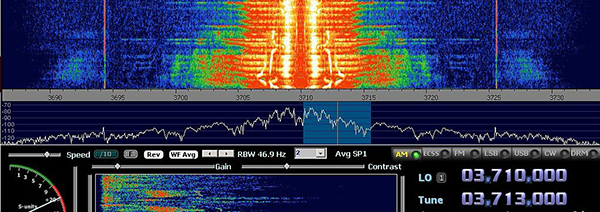
Peter, G3PLX has written a freeware Windows program which automates the process of monitoring and logging the reception reception of the three beacons. A commitment of this nature does however need a dedicated aerial, receiver and computer. The program will run under Windows 95 or later, and connects to a receiver (on which the AGC can be disabled) via a standard PC soundcard. The program carries out the function of a 1Hz bandwidth audio filter but can compensate for moderate amounts of frequency drift in the receiver and timing drift in the computer clock . The latest version of the program has improved frequency tracking and also produces a file showing the time/amplitude plot. The program records the signal level and the noise level, both in an on-screen chart and a disk file. This file is in a form suitable for later processing such as in a spreadsheet or for uploading to a website, see link for an example of beacon reception across the UK. Free monitoring software & information on an SDR option for the receiver.The monitoring program, called GB3RAL.zip, can either process audio from a conventional receiver or else the two I & Q audio channels from a direct conversion receiver. The program also provides COM port switching for external devices, e.g. aerial switching, WSPR beacon, etc. Details for all of these options are in the help file. Unlike the manual method of monitoring, G3PLX's program carries out a much more detailed signal to noise assessment, with the output recorded in dB. The 5MHz Working Group's consolidate database has a separate table for this data, which with suitable subsequent analysis will allow it to be related to the data captured from manual monitoring of QSOs and the beacons. Experimentation is currently underway with the use of the v6.2 SoftRock Lite kits together with the IQ version of the monitoring program. Whilst this combination has been proven to work well with a narrow-band loop aerial it is not certain whether additional filtering will be required in some cases the SoftRock board is used with dipoles, etc. For 5MHz monitoring a special version of the v6.2 SoftRock Lite kit, called SoftRock-60 can be obtained from Tony Parks, KB9YIG, through the Yahoo group http://groups.yahoo.com/group/softrock40/. A suitable crystal will be need, typically 4 x 5228.5kHz, or 20.914MHz for the production of the two local oscillator drives at 5.2285MHz within the SoftRock-60 board. This mixing function down-converts the 5.29MHz beacon signals to I & Q channel pairs, centred on 1.5kHz for processing in the computer's soundcard. Whilst SDR radios normally require a higher performance computer soundcard to fully exploit the capability of the software aspects of the hybrid radio combination, the gb3ral.exe program is designed to work with a standard SoundBlaster type of soundcard. Log file conversion toolNick, G4IRX, has provided a range of online support tools and visualisations to support the 5MHz experiment For those who have log files from the original gb3ral.exe program there is a logfile conversion tool whereby one loads in the original "single beacon" logfile from the gb3ral.exe program. It returns a file in the format of the current "3 Beacon" form of the gb3ral.exe program and also gives a visualisation of the log file. These converted files can then be send to the 5MHz Working Group for inclusion in the 5MHz Experiment's database. Filenames and header details
To ease the workload when uploading the data it is preferred that the data is in one large file, rather than lots of small files. To do this all one needs to do is to close down the GB3RAL.exe program without stopping the logging. That way when you next open GB3RAL.exe, the program starts logging the new data to the end of the existing file. Clearly, when the QTH or more likely the aerial is changed at your monitoring location we would like you to start a new file as data about your station will be different. You should also start a new file when the file size is such that it would take too long to send by e-mail. There is no hard and fast rule, but submitting a file monthly would be about right. In order to allow the full potential of the relational aspects of the database that is being created it is further requested that all data files submitted should have the following information added to the file in the header line, or else included separately in the body of the e-mail. When adding the data to the 3b_g3wkl_ddmmyy.txt file separate each field with a space. The data should conform to the following definitions: a) Callsign of monitoring station, i.e. the reporting station's callsign, e.g. G3WKL b) QTH Locator of monitoring station, i.e. the reporting stations QTH Locator, e.g. IO92PC c) Antenna Type, i.e. the designators are RD, NRD, V, L or O for resonant dipole, non-resonant dipole, vertical, loop and other respectively. d) Height, for the physical aerial height AGL as an integer in metres e) Polarisation, for recording of H, V or M (respectively, horizontal, vertical or mixed polarisation) An example of such a data file would be: G3WKL IO92PC L 5 H SE/NW Note: please don't enter any other data into the header record - it will only have to be stripped out prior to processing. Whilst adding this text string to the gb3ral.exe output file can be done manually using a simple text editor, e.g. Notebook (on Windows platforms), one could automate the process by creating a text file that just contains the text string, e.g. filename: loghdr.txt and then using a *.cmd or *.bat file (for Windows platforms, depending upon version) one can arrange for the loghdr.txt data to be added to the monitoring data in the gb3ral.exe output file. Graph plottingAnother useful online utility provided by Nick, G4IRX, is a tool to visualise your data, and really helps one to sort through old log files as a part of the analysis process. This graph plotting tool allows up to 7 days of data to be graphically displayed. |
© Radio Society of Great Britain
Home page